


PayRange
4.443.43K Reviews
App Specs
- Version
- 7.1.0
- Updated On
- License
- Free
- Downloads
- 1,000,000+
- Developer
- PayRange Inc.
- Categories
- Shopping
- Platform
- Android, iOS
Screenshots
 Analysis by AppCompare
Have you ever found yourself fumbling for coins at a vending machine or laundromat, only to realize you’re short a few quarters? Enter PayRange, the app that might just save your day. After using it for a bit, I've got the lowdown on what makes this app tick and whether it’s worth your time (and digital dimes).
A shared errand where cash is awkward
I can see the appeal most clearly in a shared laundry room. Imagine bringing a basket downstairs, discovering the machines take mobile payment, and realizing nobody brought the household change jar. With a compatible machine, paying by phone can make that small chore less of a scavenger hunt. The same convenience applies when several people in a household use vending machines during a busy day: each person can handle their own purchase rather than passing around coins.
That convenience has a boundary, though: a payment app is not a household organizer. I would not assume that one person can manage everybody’s spending or that family members share a wallet automatically. Before relying on it for a group errand, decide who will make the payment and how the household will settle up. For shared laundry, agreeing on that beforehand is simpler than trying to sort it out beside a machine.
Set up your own payment routine
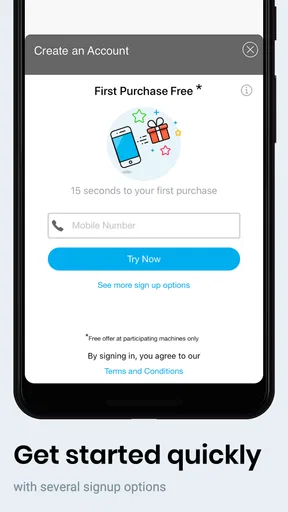
PayRange is a free shopping app from PayRange Inc., available for Android and iOS. The setup is straightforward: install it, create an account, and get ready to use it at participating machines. Its practical value depends less on how often you open a shopping app and more on whether the machines you actually use support it. I’d check for the app’s presence on a machine before building a routine around it.
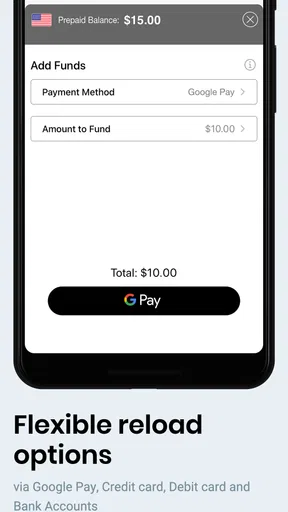
There is a useful choice between paying as you go and keeping funds in the app’s wallet. Loading money in advance can make repeat purchases quicker, but it also means thinking about what remains in that balance if your visits are occasional. I’d start with the simplest payment approach that suits my habits, then consider a wallet only if I use compatible machines regularly. That small decision can keep a convenience feature from turning into an unused balance to remember.
The app’s map can help with planning, but I would treat it as a starting point rather than a guarantee that a machine will be available or working when I arrive. If I’m heading somewhere specifically to do laundry, I’d still have a backup payment plan. A map is most useful when I’m already nearby and want to see whether a compatible option is worth trying, rather than when the whole trip depends on it.
Coordinating without assuming shared access
For a household, I’d keep account ownership and payment responsibility clear. Each adult can decide whether to use an account for their own purchases; if one person pays for a shared load, the others can agree on reimbursement outside the app. That may sound basic, but it avoids the awkward question of whose stored funds were used. I would not hand over my login as a shortcut: payment accounts are easier to manage when each person understands which account and payment method they are using.
Worth Reading Before You Choose

EA SPORTS FC Mobile 26 Is a Bigger Football Game, but It Takes Time

Flipboard Shows What News Apps Must Do Beyond the Feed

Switching to Android Auto Means Rethinking Your Driving Routine

Google Calendar Makes a Crowded Week Easier to Manage

Ludo King Makes the Most of the Minutes Between Plans

Baby Panda World Brings Quick Play to Modern Phones, but Its Game Library Feels Busy
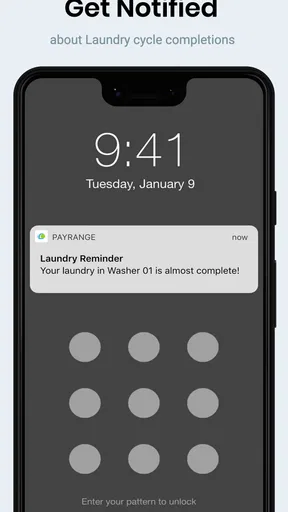
Notifications can also be useful for keeping track of completed transactions, especially if you are making several small purchases across a day. I’d glance at them as a record, not as a full household budget. For shared spending, a quick note or a conversation may still be needed to distinguish one person’s snack from a load of communal laundry.
In practice, I’d use PayRange for the transaction it is built around, then keep the rest of the coordination simple. For example, if I’m doing laundry for the household, I can tell everyone I’m handling that payment and settle the cost in the usual way afterward. That workflow avoids expecting the app to provide family controls it is not presented as offering.
Age, trust, and who should use it
The content rating is Everyone, but that does not mean every child should manage a payment account independently. For younger users, I’d keep an adult involved in account setup and spending decisions. An older teen who understands the payment method and has permission to use it may find the app convenient, but the household should still be clear about whether the phone owner or another person is responsible for charges.
My trust check would be practical: use a payment method you are comfortable with, pay attention to transaction notifications, and avoid leaving a shared phone signed in where someone else could make purchases. Those are sensible habits for any app used to pay at a machine. The app’s straightforward purpose is a plus, but it does not replace ordinary care around a device and account.
People who rarely use vending machines or laundromats may not gain much from installing another payment app. Likewise, if the nearby machines do not accept it, cash or the machine’s own payment options are the better choice. PayRange is most appealing to someone who repeatedly encounters compatible machines and wants to avoid carrying exact change—not to someone looking for a general-purpose shopping service.
Getting Started with PayRange
So, what’s the deal with PayRange? Essentially, it’s a mobile payment app designed to make those everyday transactions—like buying a snack or doing laundry—super simple. It’s available on both Android and iOS, which is always a plus. Setting it up is a breeze. Just download the app, sign up, and you’re good to go. The interface is pretty intuitive, so even if tech isn’t your thing, you’ll be navigating like a pro in no time.
How It Works
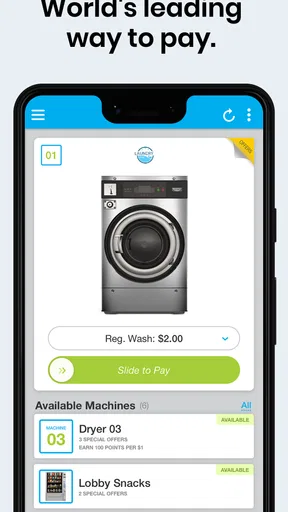
The app connects to machines via Bluetooth. Once you're within range of a compatible machine, you just open the app, select the machine, and pay. Easy peasy. No more digging through your pockets for spare change. The app supports various payment methods, so whether you’re a card person or a Google Pay enthusiast, you’re covered.
I found the connection pretty reliable, though there were a couple of times when it took a second try to link up. But hey, nothing’s perfect, right? The app also features a handy map that shows nearby PayRange-enabled machines, which is great for planning your next snack attack.
Features That Stand Out
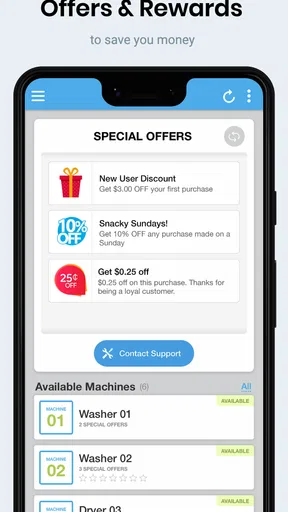
One of the coolest features is the ability to load funds in advance. You can add money to your PayRange wallet and breeze through transactions without worrying about your card or bank balance. Plus, the app often offers promotions and rewards, which is a nice little bonus to keep things interesting.
Another neat feature is its integration with loyalty programs. Some machines offer discounts and rewards for frequent usage, which can be a sweet deal if you’re a regular. This feature definitely sets it apart from other payment apps.
User Experience
I’ve got to say, using PayRange is pretty seamless. The app design is clean, straightforward, and user-friendly. The color scheme is easy on the eyes, and navigation is a breeze. Plus, the app sends notifications whenever a transaction is completed, which is great for keeping track of your spending.
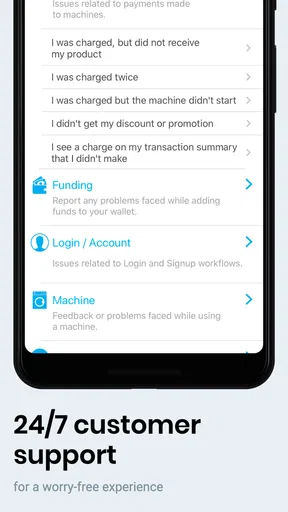
Customer support is responsive, which is always a big plus in my book. If you run into any issues, help is just an email away. I had a minor hiccup with a transaction, and they sorted it out quickly.
Compared with carrying coins, the main advantage is obvious: you can pay from your phone without searching for exact change. Compared with using a machine’s other available payment methods, the benefit is more situational. If you already have a convenient option at the machine, there may be little reason to switch; if you often arrive without cash, mobile payment can remove a recurring annoyance. I’d choose based on the machines I use, not on the assumption that every machine accepts the app.
A practical first visit is simple: install the app before you need it, set up the account when you have a moment, and check that the machine is compatible before starting a purchase. If the phone does not connect on the first attempt, I’d pause and retry near the machine rather than repeatedly tapping through payment screens. Keeping another way to pay available is sensible when the machine or connection does not cooperate.
The app has been around since October 20, 2014, and its current version is 7.0.7, with Android support starting at version 6.0. Its average rating is 4.5 from around 95,000 ratings, and it has more than one million installs. Those figures suggest that many people have tried it, but the deciding factor for me remains local usefulness: whether the machines in my routine support it and whether I make enough small transactions to value the convenience.
Final Thoughts
So, should you give PayRange a whirl? If you find yourself frequently using vending machines or laundromats, this app is definitely worth a look. It simplifies the payment process and eliminates the hassle of carrying cash. Plus, the added perks of rewards and promotions make it a pretty appealing option.
While it’s not without its occasional hiccups, the convenience it offers is hard to beat. Give it a try, and you might just find yourself wondering how you ever managed without it. So, go ahead and ditch those coins—you won’t miss them.
My household verdict
I’d recommend it to adults and older teens who regularly use compatible machines and are comfortable handling payments on a phone. For a household, the best approach is to keep account responsibility clear, treat wallet funds as a personal payment choice, and agree in advance who pays for shared laundry. That makes the app useful without pretending it is a family account manager.
If your use is occasional, your nearby machines are not compatible, or you prefer to keep payments entirely in cash, there is no need to force a change. For me, this is a practical, focused tool rather than an essential app for everyone. Its strongest case is a repeated, specific nuisance—being short on coins at a machine—and in that situation, it can make an ordinary errand noticeably easier.
Pros
- User-friendly interface for quick access.
- Wide range of supported machines.
- Secure transactions with encryption.
- No need for physical cash or cards.
- Real-time payment notifications.
Cons
- Limited to participating locations.
- Requires stable internet connection.
- Occasional app crashes reported.
- Some users face delayed transactions.
- Not all payment methods supported.
FAQs for PayRange
What is PayRange and how does it work?
PayRange is a mobile payment app that allows users to make contactless payments on vending machines, laundry machines, and other automated services. By using Bluetooth technology, PayRange connects to compatible machines, enabling users to simply swipe up on their smartphone to pay. This app eliminates the need for cash or credit cards, making transactions quick and convenient.
Is PayRange secure for making payments?
Yes, PayRange is designed with security in mind. It uses encryption to protect your payment information, ensuring that your data is safe during transactions. Additionally, the app does not store your credit card information on your device, adding an extra layer of security. Users can also enable biometric authentication for further protection.
Do I need an internet connection to use PayRange?
While an internet connection is required to initially set up the app and load funds, PayRange primarily operates through Bluetooth to connect to machines. This means you can use the app to make payments even without an active internet connection, as long as your device’s Bluetooth is enabled.
What types of machines are compatible with PayRange?
PayRange is compatible with a wide range of machines, including vending machines, laundry machines, parking meters, and kiosks. The app works with any machine equipped with a PayRange-enabled device. Users can easily find compatible machines by checking for the PayRange logo or using the app’s location feature to discover nearby machines.
Are there any fees associated with using PayRange?
PayRange itself does not charge users any fees for making payments. However, some machines might have a small convenience fee added to the transaction, which is determined by the machine operator. It’s advisable to check for any additional charges when making a payment. Users can also contact customer support for specific inquiries about fees.


